TLDR
- GDPR applies if you have EU visitors, your location, team, and servers don’t matter.
- Personal data is more than just name and email, it’s anything that can identify a person.
- Consent must be explicit and opt-in, no pre-ticked boxes, no “by continuing to use…” clauses.
- Consent date and method must be stored, the burden of proof is on you.
- Cookie-less analytics can be fully compliant without any consent banner, if no personal data is involved.
What is GDPR?
A European Union regulation, in force since 2018, that governs how organisations collect, store, and use personal data of people in the EU and EEA.
The goal of GDPR is to give people control over their own data, who has it, what it’s used for, and the right to have it deleted.
You as a website owner are responsible for any personal data you collect from EU visitors. That means knowing what you collect, why you collect it, and having a lawful reason for doing so.
Not complying with GDPR isn’t just a legal risk, it’s a business one. Fines can reach €20M or 4% of global annual revenue, whichever is higher. But beyond fines, a publicised breach or complaint erodes user trust fast, and that’s often harder to recover from than any penalty.
Who does GDPR apply to?
Anyone processing data of EEA residents, regardless of where your company, team, or servers are. Article 3 is explicit: offering services to EU users brings you in scope. The EDPB’s Guidelines 3/2018 confirm this, physical presence in the EU is not required.
Know the two roles: controller and processor. Controllers carry the main obligations, that’s you. Processors need a signed Data Processing Agreement (DPA), that’s anyone who touches and processes production user data.
For example: you’re the controller, and Vercel, Mailchimp or Stripe are processors. They touch your users’ data, but only to provide their service to you. Each of them needs a signed DPA.
What is exactly personal data?
Any information that can identify a person, directly or indirectly. The obvious ones: name, email, phone number, home address. But GDPR casts a wider net than most people expect.
IP addresses count. Cookie identifiers count. Device fingerprints, a combination of browser version, screen resolution, installed fonts, timezone, count. Even a user ID in your database counts, if it can be traced back to a real person.
The key test is whether someone could be singled out from the data, alone or in combination with other data. If yes, it’s personal data, and GDPR applies to how you handle it.
What doesn’t count: truly anonymous data, where re-identification is not possible. Aggregate stats like “432 visitors from Germany this week” are fine. A hashed IP that can be reversed is not.
What counts as valid consent?
Per Article 7 and Recital 32: freely given, specific, informed, and unambiguous. The user must take a clear affirmative action before data collection starts. No pre-ticked boxes, no bundling, no dark patterns.
Withdrawal must be as easy as giving consent.
What needs to be stored?
Per Article 7(1), you must keep records of when and how consent was obtained, the burden of proof is on you.
In practice, for each consent event you need to store:
- Who consented, a user ID, session ID, or email
- When, a timestamp of the consent action
- What they consented to, e.g. “Google Analytics cookies”, not just “analytics”
- How, which version of the consent banner or UI they saw
- Where, the page the consent was collected on
The “what” and “how” are the ones most people miss. If you ever update your cookie banner wording, you need to prove which version a specific user agreed to, so versioning your consent UI matters.
Do I need consent for cookie-less analytics tools?
The short answer: no, if no personal data is collected.
Two laws, two triggers
Two separate legal frameworks apply here:
- ePrivacy Directive (Article 5(3)), requires consent before storing or accessing anything on a user’s device. This is what drives cookie banners. It applies to cookies, pixels, fingerprinting scripts, and anything that reads or writes to the browser.
- GDPR (Article 6), requires a lawful basis for processing personal data, regardless of cookies. Even without touching the device, if you collect something that can identify a person, GDPR applies. To skip consent entirely, you need to avoid both triggers: nothing written to the device, and no personal data collected server-side.
A great example: Umami
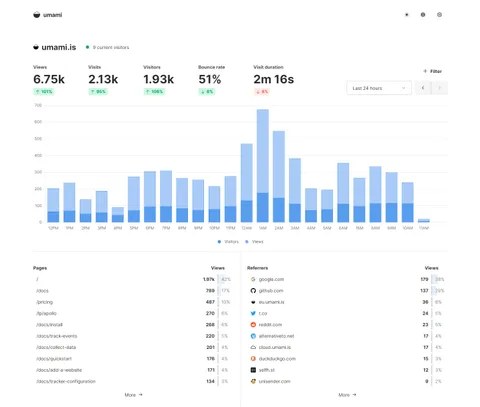
Umami is an open-source, self-hostable analytics tool built with privacy as a default, not an afterthought. It gives you the essentials, page views, referrers, devices, countries, without collecting anything that falls under GDPR’s definition of personal data.
Per Umami’s own documentation: “All data is anonymized and no personally identifiable information is stored.” Because no personal data is collected, GDPR’s definition of personal data under Article 4 is never triggered. And because nothing touches the browser, ePrivacy Article 5(3) doesn’t apply either.
Result: no consent banner needed. Every visitor is counted. Analytics are accurate.
One caveat: the identify() API
Umami has an optional identify() API that lets you attach custom user properties, name, email, user ID. If you use this, you’re now collecting personal data, and GDPR fully applies. Keep it off unless you have a clear legal basis and understand the implications.
How to ask for consent with multiple analytics tools
If you run both a cookie-less tool like Umami and a cookie-based one like Google Analytics, you don’t need to treat them the same way, and you shouldn’t.
Umami runs for everyone, no consent needed. Google Analytics only loads after the user accepts. Your consent banner should reflect this clearly: label it as Google Analytics consent, not “analytics” in general.
The one thing to avoid: implying that rejecting the banner means zero tracking. If Umami is always running, say so, briefly and plainly. Something like: “We use privacy-first analytics that collect no personal data. If you accept, we also load Google Analytics for more detailed insights.”
Transparent, accurate, and it keeps both tools working as intended. Umami gives you complete data on everyone. Google Analytics gives you richer data on the subset who consent.
Recommended consent tracking
Since Umami is GDPR-compliant by default, we can use it to track consent submissions.
umami.track('consent', { consented_to: 'google_analytics', banner_version: 'v2' })These events will show up in Umami as custom events under the Events tab. Each event gets:
- timestamp
- event name (e.g.
consent) - session ID
- page it was fired from
- any custom properties (e.g.
consented_to,banner_version)
The catch: Umami’s event data isn’t really designed as an audit log. You can see the events, but querying them formally (e.g. “show me all users who consented before date X to banner version Y”) requires either digging into the Umami database directly, or exporting the data. If you’re self-hosting, you have full database access so that’s doable, but it’s not a polished interface for compliance records.
It works, it’s free, and it’s zero extra setup. But if a regulator ever asked for consent records, you’d be exporting CSVs from Umami rather than pulling a clean report.
Recommended tools
- Open-source analytics tool: Umami
- Instant self-host platform for Umami: PikaPods
- Free cookie consent for WordPress: Pressidium Cookie Consent
- Cookie consent in vanilla JavaScript: vanilla-cookieconsent
This post is not legal advice. When in doubt, consult a qualified privacy lawyer or your local Data Protection Authority.